




 Security Center Alerts



TAKE YOUR BANKING
"TO GO."
Use our mobile app to access your account wherever life takes you.
Learn More

Mobile App
On-the-go access to your accounts from your Apple or Android smartphone or tablet.
Get Started
Online Banking
Convenient web-based access to your accounts from any desktop computer or tablet.
Learn More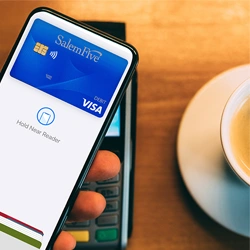
Our Mobile Banking App is perfect for people on the move.
-
Manage
With mobile deposit you can deposit checks from virtually anywhere
-
Pay
Zelle® is a fast, safe and easy way to send and request money
-
Protect
With Card Controls you can manage and monitor your Salem Five Visa® Debit Card
Manage
Salem Five’s digital banking lets you be in control with access to your accounts 24/7. We make it convenient to manage how, when and where you do your banking.
eStatements and Documents
Secure Access To Your Account Statements
We’ve made it easy and convenient for you to view your electronic account statements and notices online or via our Mobile Banking App. Once you enroll, you’ll get notified via email when your account statement is available online. And you can view up to seven years of statement history. If you want a “hard” copy, the statements are easy to print at home. With enrollment, you can also gain easy online access to annual tax documents for handy reference.
Personal Finance Manager
Money Manager
External Transfers
Transfer funds between banks
With Digital Banking, it's easy to transfer funds between your personal Salem Five checking or savings account and your accounts at other U.S. financial institutions. After a one-time setup process, you can easily transfer between Salem Five and your other accounts within Online Banking.
Mobile Deposit
Deposit checks from anywhere
Save yourself a trip to the bank. With mobile deposit, you can deposit a check without leaving your house or even on the go! With our mobile app, you can safely and securely deposit checks using your smartphone camera. It’s easy and convenient.
Digital Assistance
Connect with Salem Five 24/7
Connect with a customer service agent live during business hours with our Online Chat feature. Or, anytime day or night, you can get information from our Digital Assistant. The assistant is able to answer hundreds of everyday questions you may have and save you a phone call. Just look for the yellow bubble on the lower right hand side of our website to access.
Card Controls
Pay
Our tools make is easy to pay bills, make purchases in-store or even pay a friend. With the latest in technology, you can even pay for purchases using your smartphone.
Bill Pay
Bill paying made simple
Salem Five's Digital Bill Payment Service offers a centralized platform accessible via mobile and desktop for managing and paying bills. It features organizational tools like biller groups, up to 24 months of payment history, recurring payments with Autopay, bill pay reminders, and e-bill enrollment.
Zelle®
It’s a fast, safe and easy way to send money.
Digital Wallet
Make payments with your smartphone
Make payments quickly and easily without even taking your Debit Card out of your wallet. You can shop in thousands of stores, in apps, and of course online with just your mobile device or desktop computer. And, use your Digital Wallet with confidence, knowing there are safeguards in place to protect your information. Every time you use one of these trusted solutions, a unique one-time-use number, or token is used so that your payment information is never shared with merchants or stored on your device.
Choose your preferred Digital Wallet (Apple Pay®, Samsung Pay or Google Pay™)
eBills
Cut down on paper bills
Improve your efficiency, and reduce the amount of snail mail you receive, by signing up for e-bills. Electronic versions of the paper bills you receive in the mail, e-bills come directly to your Salem Five Online Banking account, where you can view, pay, and electronically file them away. Using e-bills means better record-keeping, quicker payment turnaround, and less risk of error.
Protect
Security is key when it comes to your finances and our tools make it easy. You can choose to get alerts or manage spending limits on your debit card. And access to your accounts is always secure with personalized Touch ID, facial recognition or your pin.
Real-Time Alerts
Stay on top of your account activity
Card Controls
Manage & Protect your cards right from our Mobile App
Security with Face ID®
Log into Salem Five's Mobile Banking app with Face ID®
Getting Started | Enroll
Your accounts are immediately available in just a few minutes. To complete your online enrollment, click "Enroll" and follow the prompts.